
Best Business Website Kaise Banaye: Complete Guide 2026
Aaj ke digital time mein har business ke liye website hona bahut zaroori ho gaya hai. Chahe aap small business chalate ho, freelancer ho, ya startup start kar rahe ho, ek professional website aapko online presence, trust aur leads dono deti hai.
Agar aap soch rahe ho business website kaise banaye, to yeh guide aapke liye step-by-step roadmap hai. Isme hum basics se lekar advanced cheezein simple language mein samjhenge, taaki beginners bhi easily samajh sakein.

What Is a Business Website?
Business website ek online platform hota hai jahan aap apne products, services, contact details aur brand information dikhate ho.
Simple words mein Aapki website aapka online office hoti hai
Yahan se log:
- Aapke services samajhte hain
- Aapse contact karte hain
- Aap par trust build karte hain
Why a Business Website Is Important in 2026
Aaj ke time mein 80% se zyada log kisi bhi service ko lene se pehle online search karte hain. Agar aapki website nahi hai, to aap potential customers lose kar sakte ho.
Key Benefits:
- Online visibility
- Brand trust
- 24/7 availability
- Lead generation
- Business growth
Step-by-Step Guide: Business Website Kaise Banaye
Step 1: Choose a Domain Name
Domain aapki website ka naam hota hai (jaise: yourbusiness.com).
Tips:
- Short aur simple rakho
- Brand name use karo
- .com prefer karo
Step 2: Buy Hosting
Hosting ek server hota hai jahan aapki website store hoti hai.
Types of Hosting:
- Shared Hosting (Beginners ke liye)
- VPS Hosting
- Cloud Hosting
Beginners ke liye shared hosting best hoti hai.
Domain Hosting Steps (Important)
| Step | Action |
|---|---|
| 1 | Domain purchase karo |
| 2 | Hosting buy karo |
| 3 | Domain ko hosting se connect karo |
| 4 | SSL install karo |
| 5 | Website setup start karo |
Step 3: Choose Platform (WordPress Recommended)
Website banane ke liye aapko platform choose karna hota hai.
Popular Platforms:
- WordPress
- Shopify
- Wix
WordPress sabse popular aur beginner-friendly hai.
Step 4: Install Theme (Design)
Theme aapki website ka design decide karti hai.
Tips:
- Clean and professional design uses Karo
- Mobile-friendly theme choose karo
- Fast loading theme lo
Step 5: Add Important Pages
Har business website mein kuch basic pages hone chahiye:
- Home
- About Us
- Services
- Contact
- Privacy Policy
Step 6: Add Content
Content sabse important part hai.
Aapko include karna chahiye:
- Clear services description
- Images
- Call-to-action (CTA)
- Contact details
Step 7: SEO Optimization
Agar aap chahte ho ki website Google par aaye, to SEO zaroori hai.
Basic SEO Steps:
- Keyword use karo (business website kaise banaye)
- Meta title & description add karo
- Images optimize karo
- Fast loading speed maintain karo
Step 8: Mobile Optimization
Aaj ke time mein 70% users mobile use karte hain.
Website mobile-friendly honi chahiye
Step 9: Test & Launch
Launch se pehle check karo:
- Website speed
- Links working hai ya nahi
- Mobile view
- Contact form
Cost of Creating a Business Website
| Item | Cost (India) |
|---|---|
| Domain | ₹500 – ₹1,500/year |
| Hosting | ₹2,000 – ₹10,000/year |
| Design | ₹5,000 – ₹50,000 |
| Development | ₹10,000 – ₹1,00,000+ |
Common Mistakes to Avoid
Jab log apni pehli website banate hain, to kaafi common mistakes kar dete hain jo unki growth ko slow kar deti hain. In mistakes ko avoid karke aap apni website ko zyada professional aur effective bana sakte ho.
Sabse pehli mistake hoti hai free domain use karna. Bahut log free platforms par website bana lete hain jisme domain kuch aisa hota hai: yourname.freewebsite.com. Isse aapka brand professional nahi lagta aur users ka trust kam ho jata hai. Hamesha custom domain use karo jaise .com ya .in.
Dusri common problem hai slow website banana. Agar aapki website load hone mein zyada time leti hai, to users turant exit kar dete hain. Google bhi slow websites ko rank nahi karta. Isliye speed optimization bahut important hai.
Teesri mistake hai SEO ignore karna. Sirf website banana kaafi nahi hai, usse Google par visible bhi hona chahiye. Agar aap SEO nahi karoge, to aapki website par traffic nahi aayega, chahe design kitna bhi acha ho.
Chauthi mistake hai poor design use karna. Ek outdated ya messy design users ko confuse karta hai. Clean, simple aur mobile-friendly design use karna chahiye taaki user experience better ho.
Aur last but important, contact details na dena. Agar user aapse connect hi nahi kar paayega, to wo client kaise banega? Contact page, phone number, email aur WhatsApp option zaroor add karo.
Tips for Better Website Performance
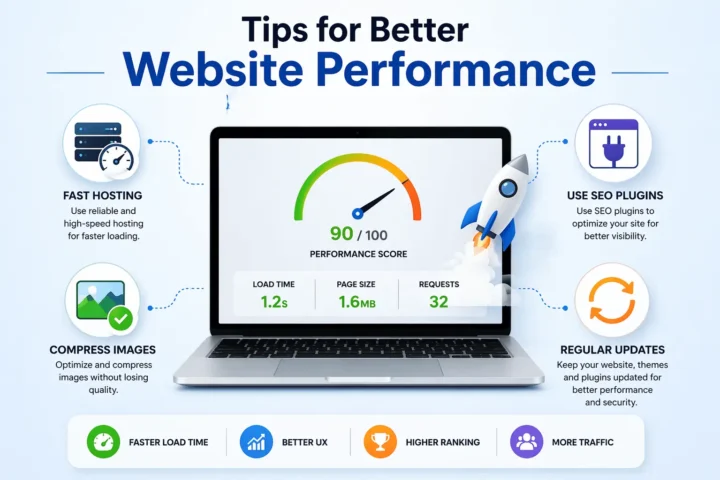
Agar aap chahte ho ki aapki website fast chale, achha perform kare aur users ko attract kare, to kuch simple tips follow karna zaroori hai.
Sabse pehle, fast hosting use karo. Hosting aapki website ki foundation hoti hai. Cheap aur low-quality hosting lene se website slow ho sakti hai. Thoda invest karke reliable hosting lena better hota hai.
Dusra, images compress karo. High-quality images important hoti hain, lekin unka size bada hone se website slow ho jati hai. Image compression tools use karke aap speed improve kar sakte ho.
Teesra, SEO plugins use karo. Agar aap WordPress use kar rahe ho, to plugins jaise Rank Math ya Yoast SEO aapko website optimize karne mein help karte hain. Ye aapko keyword placement, meta tags aur readability improve karne mein guide karte hain.
Chautha, regular updates karo. Website ko update rakhna bahut zaroori hai. Chahe wo content ho, plugins ho ya design, sabko time-to-time update karna chahiye taaki website secure aur relevant rahe.
Real Example
Chaliye ek simple real-life example se samajhte hain.
Agar aap ek website developer ho, to aap apni website ko ek powerful marketing tool bana sakte ho. Sabse pehle aap apna portfolio show kar sakte ho, jisme aapke previous projects aur designs dikhaye jaate hain. Isse potential clients ko aapka work samajhne mein help milti hai.
Phir aap apni services list kar sakte ho, jaise website development, SEO, redesign, hosting, etc. Clear service description se client ko pata chalta hai ki aap kya offer karte ho.
Sabse important, aap contact form add kar sakte ho, jahan se users directly aapse enquiry bhej sakte hain. Saath hi WhatsApp button ya call option add karna bhi helpful hota hai.
Jab aapki website properly optimized hoti hai aur usme clear information hoti hai, to users easily trust karte hain aur aapse contact karte hain. Isi tarah aapko direct clients milne lagte hain bina kisi middleman ke, jo aapke business ko grow karne mein help karta hai.
Read More About: SEO vs Google Ads: Which is Better? Complete PPC vs SEO Guide
Final Conclusion
Agar simple words mein samjhe, to business website kaise banaye ka answer hai:
👉 Domain lo
👉 Hosting lo
👉 WordPress install karo
👉 Design aur content add karo
👉 SEO optimize karo
Ek website aapke business ko next level par le ja sakti hai agar sahi tarike se banayi jaye.
CTA – Get Your Website Today
Agar aap apni business website professional tarike se banwana chahte ho:
Call ya WhatsApp karein: 📞 +91 8851615793
Apne business ko online le jao aur leads badhao 🚀

Prashant Baghel
Hello, I’m Prashant Baghel, Founder and Technical Author at Worldtricks4u. I hold a B.Tech in Computer Science and have 7+ years of experience in web development and SEO.I’m passionate about sharing practical knowledge to help people and businesses grow online. Through Worldtricks4u, I aim to deliver useful insights and support the vision of Digital India.