
7 Powerful Website Speed Optimization Tips to Boost SEO Fast
In today’s digital world, users expect websites to load instantly. If your website takes too long to open, visitors may leave before even viewing your content. This is why website speed optimization has become one of the most important parts of modern SEO and user experience. A fast website not only improves visitor satisfaction but also helps increase search engine rankings, conversions, and overall business growth.
Search engines like Google consider page speed as a ranking factor. Slow-loading websites often experience higher bounce rates and lower engagement. Whether you run a blog, business website, or eCommerce store, improving your site speed can directly impact your online success.

Why Website Speed Optimization Matters
Website visitors usually decide within a few seconds whether they want to stay on a website or leave. A slow website creates frustration and damages trust. Fast websites, on the other hand, provide a smooth browsing experience and encourage users to explore more pages.
Website speed optimization improves several important areas:
- Better user experience
- Higher SEO rankings
- Increased conversions and sales
- Lower bounce rate
- Improved mobile performance
A one-second delay in loading time can reduce customer satisfaction and affect revenue. That is why businesses are investing heavily in improving their website performance.
Read More: 10 Powerful Content Marketing Strategy Tips for Business Growth
Common Reasons Behind Slow Website Speed
Before improving performance, it is important to understand what causes a website to slow down. Many websites become heavy because of poor optimization practices.
Large Image Files
High-quality images look attractive, but oversized image files can slow down page loading significantly. Images that are not compressed properly consume more bandwidth and increase loading time.
Poor Web Hosting
Cheap or low-quality hosting services often fail to handle traffic efficiently. Shared hosting with limited resources can make websites slower during peak hours.
Excessive Plugins
Using too many plugins or poorly coded plugins increases server requests and affects website performance. This issue is common in content management systems like WordPress.
Unoptimized Code
Heavy CSS, JavaScript, and unnecessary code can make pages load more slowly. Clean and lightweight coding improves website speed optimization.
Too Many HTTP Requests
Each image, script, and file on a webpage creates an HTTP request. More requests mean longer loading times.
Best Practices for Website Speed Optimization
Improving website speed requires a combination of technical improvements and smart optimization methods. Here are some effective ways to speed up your website.
Optimize Images Properly
Images are often the largest elements on a webpage. Compressing images without reducing quality can improve loading speed dramatically.
Use modern image formats such as WebP and resize images according to the website layout. Avoid uploading extremely large images when smaller dimensions are enough.
Tools like TinyPNG and ImageOptim can help reduce image size effectively.
Use Fast and Reliable Hosting
Your hosting provider plays a major role in website performance. Choosing a reliable hosting service with good server response time can improve speed immediately.
Cloud hosting and VPS hosting are often better choices for growing websites because they provide more resources and stability.
Enable Browser Caching
Browser caching allows visitors’ browsers to store website files temporarily. When users revisit the website, the browser loads saved files instead of downloading them again.
This reduces loading time and improves user experience.
Minify CSS, JavaScript, and HTML
Minification removes unnecessary spaces, comments, and unused code from website files. Smaller file sizes load faster and improve overall performance.
Many optimization plugins and tools automatically handle code minification.
Use a Content Delivery Network (CDN)
A CDN stores website content on multiple servers worldwide. When users visit your website, content is delivered from the nearest server location.
This reduces latency and improves loading speed for global visitors.
Popular CDN providers include Cloudflare and BunnyCDN.
Reduce Redirects
Too many redirects increase loading time because browsers must load multiple URLs before reaching the final page.
Keep redirects minimal and remove outdated redirect chains whenever possible.
Enable GZIP Compression
GZIP compression reduces file sizes before sending them to visitors’ browsers. Smaller files load faster and improve website speed optimization significantly.
Most modern hosting providers support GZIP compression.
Website Speed Optimization Techniques Comparison
| Optimization Method | Main Benefit | Impact on Speed |
|---|---|---|
| Image Compression | Reduces image size | High |
| Browser Caching | Faster repeat visits | Medium |
| CDN Usage | Faster global access | High |
| Minifying Code | Smaller file sizes | Medium |
| Better Hosting | Improved server response | High |
| GZIP Compression | Faster file transfer | Medium |
Mobile Speed Optimization
Mobile traffic now dominates the internet. A website that works well on desktop but performs poorly on mobile devices can lose a large number of visitors.
Mobile optimization should focus on lightweight design, fast-loading images, and responsive layouts.
Use Responsive Design
Responsive websites automatically adjust according to screen size. This improves usability and loading performance on smartphones and tablets.
Avoid Heavy Popups
Large popups and intrusive ads slow down mobile websites and create a poor user experience. Keep mobile layouts clean and user-friendly.
Optimize Fonts
Using too many custom fonts increases loading time. Limit font styles and use optimized web fonts for better performance.
Importance of Core Web Vitals
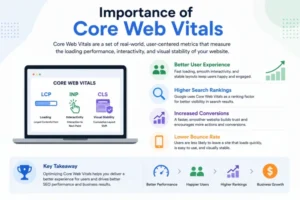
Core Web Vitals are performance metrics introduced by Google PageSpeed Insights to measure user experience. These metrics are important for SEO and website speed optimization.
The three main Core Web Vitals are:
Largest Contentful Paint (LCP)
Measures how quickly the main content loads. A good LCP score should be under 2.5 seconds.
First Input Delay (FID)
Measures how fast a website responds when users interact with it.
Cumulative Layout Shift (CLS)
Measures visual stability and checks whether page elements shift unexpectedly during loading.
Improving these metrics helps websites rank better and deliver smoother experiences.
Tools to Test Website Speed
Several free tools help analyze website performance and identify issues.
Google PageSpeed Insights
This tool provides detailed performance reports and suggestions for improvement.
GTmetrix
GTmetrix analyzes loading speed and shows recommendations to optimize website performance.
Pingdom Website Speed Test
Pingdom helps monitor loading times and page performance from different locations.
Regular testing is important because website performance can change over time due to updates, plugins, or added content.
How Website Speed Optimization Affects SEO
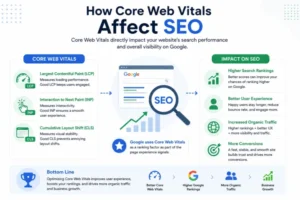
Search engines aim to provide the best user experience. Fast-loading websites generally perform better in search rankings because users engage with them longer.
Website speed optimization also improves crawl efficiency. Search engine bots can index pages faster when websites load quickly.
Additionally, faster websites often experience better conversion rates because users are more likely to stay and take action.
Final Thoughts
Website speed optimization is no longer optional. A fast website improves user experience, strengthens SEO performance, and increases business growth opportunities. Even small improvements in loading speed can make a noticeable difference in traffic and engagement.
From optimizing images and choosing better hosting to using caching and CDNs, every step contributes to a smoother and faster website experience. Regular performance testing and continuous optimization are essential for maintaining long-term website success.
Businesses that focus on speed not only satisfy users but also gain a competitive advantage in search rankings and online visibility.
FAQs
What is website speed optimization?
Website speed optimization is the process of improving a website’s loading performance to provide a faster and smoother user experience.
Why is website speed important for SEO?
Search engines consider page speed as a ranking factor because faster websites provide better user experiences.
How can I check my website speed?
You can use tools like Google PageSpeed Insights, GTmetrix, and Pingdom to analyze website performance.
Does image optimization improve website speed?
Yes, compressing and resizing images reduces file size, which helps webpages load faster and improves overall performance.
